Greenland Flag Waving Fabric Texture: A Designer’s Guide
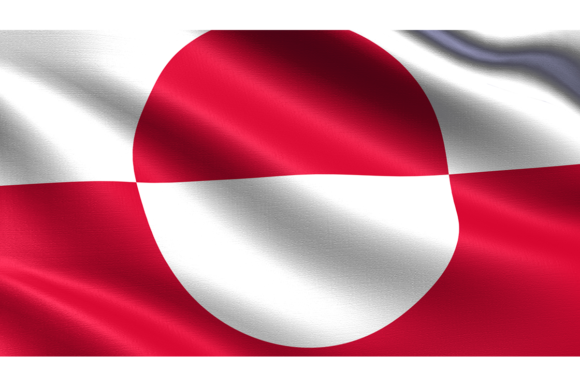
Capturing the essence of movement and national pride in a single static image is a challenge every designer faces. When you need to convey authenticity, energy, or a specific geographical context without relying on stock photography clichés, a high-quality asset like the Greenland Flag Waving Fabric Texture becomes an invaluable part of your toolkit. This isn't just a flat graphic; it is a realistic flag representation featuring a highly detailed fabric texture that mimics the organic ripples and folds of cloth caught in the wind.
The Anatomy of a Realistic Asset
What separates a generic clipart from a premium design asset is the texture. This particular image of the Greenland flag is defined by its tactile quality. You can almost feel the weight of the fabric. The red and white semicircle of the flag—symbolizing the sun and the ice—isn't merely printed on a flat plane. Instead, it distorts naturally with the curves of the material, creating deep shadows in the folds and bright highlights on the peaks. This level of detail ensures that when you place it against a background, it doesn't look pasted on; it looks integrated.
The resolution is another critical factor. At 3840×2160px, this is a true 4K asset. Whether you are working on a massive print document or scaling down for a mobile social media graphic, the integrity of the image holds up. You won't see pixelation or blurring, even when cropping in tight on a specific section of the fabric to use as a textural overlay. The .jpg format ensures broad compatibility across all major design software, from Adobe Photoshop and Illustrator to Canva and Figma.
Strategic Applications for Modern Creators
As a designer or content creator, versatility is key. You need assets that can serve multiple functions without looking repetitive. Here is how this waving flag texture can elevate your projects across different mediums:
- Presentation Backgrounds: Corporate presentations often suffer from sterile, generic backgrounds. Using the Greenland flag as a subtle, blurred background layer adds depth and context, particularly for topics involving geography, climate research, or international relations.
- Motion Graphics: For video editors, a high-res texture with natural folds is perfect for parallax effects. By separating the flag from its background and applying slight movement, you can create the illusion of a 3D object in a 2D space.
- Web Design and Hero Images: In modern web design, authenticity drives engagement. A realistic flag texture works beautifully in the hero section of a travel blog, a cultural organization’s website, or an e-commerce store specializing in global goods.
- Social Media Branding: Consistency builds brand identity. Using this specific texture for National Day posts, educational infographics, or political commentary threads ensures your visual language remains cohesive and professional.
Visual Hierarchy and Emotional Resonance
Design is about communication, and the assets you choose influence how your message is received. The "blowing in the wind" style of this flag introduces a sense of dynamism and life. A static flag can feel like a seal or a stamp; a waving flag feels active and present. This psychological trigger can influence audience engagement, making the viewer feel a sense of immediacy.
When integrating this asset, consider the principles of visual hierarchy. If the flag is your primary focus, keep the typography simple—a clean sans serif font often pairs well with organic textures because the geometric precision of the letters contrasts nicely with the chaotic flow of the fabric. Conversely, if you are using the flag as a background element, ensure you apply a slight overlay or gradient to maintain text readability. The interplay between the red and white of the Greenland flag and your chosen color palette will dictate the mood; pairing it with dark greys or blacks creates a sleek, modern look, while pairing it with earth tones feels more grounded and traditional.
Practical Integration and Licensing
Before downloading and integrating any design assets, a professional workflow requires a quick evaluation. First, check the licensing. For this specific Greenland flag texture, you need to ensure the license covers your intended use—specifically, look for clearance for commercial use if you plan to sell products featuring the image or use it in paid advertising. Most standard licenses cover web and print editorial use, but always verify.
Next, evaluate the file format. While .jpg is universal, it does not support transparency. This means the flag comes with a background. To isolate the flag, you will need to use selection tools (like the Magic Wand or Select Subject in Photoshop) or use blending modes like "Multiply" if your target background is light. Because the resolution is high, masking out the background is easier and results in cleaner edges.
Pairing Typography with Texture
Choosing the right typeface to accompany a waving flag texture is crucial. Because the image is complex and detailed, you generally want to avoid overly decorative script fonts or handwritten fonts, as they can compete with the fabric's texture and reduce legibility. Instead, opt for a sturdy serif font for a classic, authoritative feel, or a bold sans serif font for a contemporary, clean aesthetic. The goal is to let the texture of the flag provide the "art" while the typography provides the clear information.
Elevating Your Brand Identity
Ultimately, the tools you use reflect your attention to detail. By utilizing a highly detailed fabric texture