Quote Master HD | Premiere Pro: Bringing Words to Life
Let's be honest, a great quote can be the heart of a presentation, a social media post, or a video. But slapping static text on screen often falls flat. You need that text to have presence, to move with purpose, to feel as impactful as the words themselves. That's where a tool like Quote Master HD | Premiere Pro changes the game. It's not just a font or a template; it's a dedicated system for making your text a compelling visual element. As a designer and content creator, I see tools like this as essential design assets for anyone serious about their visual storytelling.
The Anatomy of a Modern Motion Graphics Template
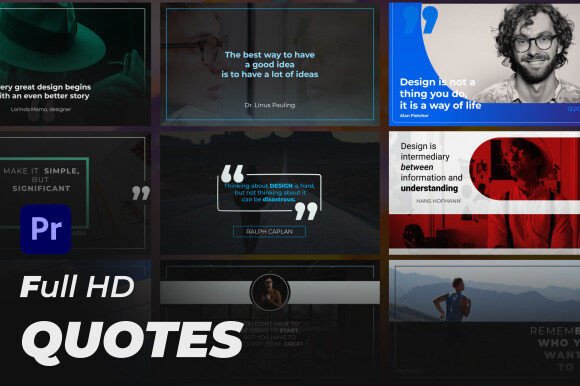
At its core, Quote Master HD is a Motion Graphics Template, or MOGRT, built for Adobe Premiere Pro. Think of it as a pre-built, professionally animated text layout. You get nine unique Full HD horizontal quotes—each with its own distinct personality and animation style. The "horizontal" part is key; it's optimized for the 16:9 aspect ratio we use everywhere from YouTube to corporate slideshows. The visual character is one of modern typography: clean lines, thoughtful spacing, and smooth, elegant animations. It’s designed to look premium without feeling stuffy, making it versatile enough for a tech startup's promo video or a wellness brand's inspirational Instagram Reel.
The real strength lies in its integration and control. Because it lives inside Premiere Pro, you don't need to jump to After Effects or learn complex software. The "full control" feature is what separates it from basic presets. You can change any color to match your brand's palette with a few clicks. It works with any font you have installed, so you can maintain your exact brand identity—just drop in your own typeface or use one of the recommended links. The drag-and-drop workflow means you can have a polished, animated quote sequence in your timeline in minutes, not hours. This isn't about replacing your creative process; it's about removing the technical barriers so you can focus on the message.
Where This Tool Truly Shines: Practical Applications
Imagine you're a content creator making a weekly video essay. Instead of using the same static lower-third for every quote, you can cycle through these nine styles to keep your visuals fresh. Each animation can subtly shift the tone—one might feel authoritative for a statistic, another more contemplative for a philosophical line. For marketers and entrepreneurs, this is gold for social media graphics. A powerful customer testimonial animated with style can stop the scroll far more effectively than a plain text card. It elevates a simple statistic into a shareable moment.
The applications extend into editorial design for digital magazines or packaging design mockup videos, where you might showcase a brand's mission statement with cinematic flair. Even for personal projects—like a family highlight reel or a hobbyist's tutorial—adding this level of polish makes the final product feel more intentional and professional. It influences audience engagement by adding a layer of visual interest that supports, rather than distracts from, the content. Good design here acts like a subtle underscore in a film; you might not consciously notice it, but you absolutely feel its effect.
Making It Work for Your Project: A Practical Guide
So, how do you decide if Quote Master HD is the right fit? First, consider your project's tone. The template's default style is sleek and modern, which aligns well with contemporary branding. If your brand identity leans more rustic or vintage, you'll want to test it thoroughly with a suitable serif font or handwritten font to see if you can bridge that gap. The ability to use any font is your biggest lever here. Pairing it with a clean sans serif font for body text elsewhere in your video will create a cohesive visual hierarchy.
Here’s my advice for implementation:
- Test with Your Content: Don't just preview it with the demo footage. Drop in your actual quotes, your brand colors, and your chosen typeface. See how it feels in the context of your real project.
- Evaluate the Pairings: While the MOGRT handles the animation, think about how these animated quotes will live alongside other text elements in your video. The goal is consistency.
- Consider the Licensing: For commercial use, always verify the license. This template is built for projects you can monetize, which is crucial for small business owners and freelancers.
The included video tutorial is worth your time. It's not just a technical walkthrough; it often contains insights on how to get the most out of the controls. A well-organized template like this respects your time, and that's a hallmark of a good creative font resource. It’s not a magic wand that fixes bad content, but for good content, it provides the professional sheen that builds recognition and trust. It turns your words from mere text into a designed element, helping your message not just be read, but be remembered.