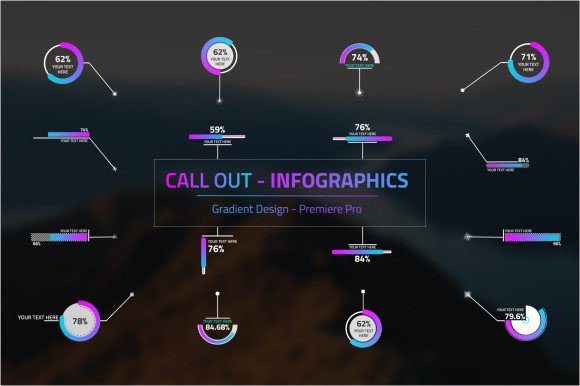
Infographics Call Out: A Motion Designer's Best Friend
Streamlining Your Premiere Pro Workflow
Every video editor knows the pain: you've got a fantastic shot, but you need to add a quick, informative callout. The traditional path involves jumping out of Premiere Pro, firing up After Effects, creating a new composition, animating the element, rendering it out, and then importing it back into your timeline. It’s a workflow that kills momentum and eats up valuable project hours. The Infographics Call Out project, specifically its MOGRT (Motion Graphics Template) version, was built to solve this exact problem. It’s not just a set of graphics; it’s a streamlined system designed for editors who value both quality and efficiency.
This isn't your average, generic template pack. The visual style of the Infographics Call Out is clean, modern, and professional. It uses a sophisticated gradient style that feels current without being distracting. The designs are versatile enough to complement a corporate presentation, a dynamic tech review, or a sleek promotional video. The "personality" of these callouts is confident and informative—they're built to deliver data and draw attention without shouting over your primary footage. With 16 distinct callout designs and 16 target points, you have a solid toolkit for almost any situation.
The Power of the MOGRT File in Your Editing Suite
The real game-changer here is the MOGRT file format. By converting the project into a Motion Graphics Template, you unlock its full potential directly within Adobe Premiere Pro's Essential Graphics panel. This means you can drag and drop a callout onto your timeline and start customizing immediately. There's no need for After Effects. You can change the text, adjust the color scheme to match your brand's color palette, resize the element, and even tweak the animation timing—all from the comfort of your Premiere Pro interface. This direct integration is a massive boost for productivity.
Think about a real-world scenario. You're editing a documentary and need to highlight a historical figure's name and title. With the Infographics Call Out MOGRT, you simply browse the Essential Graphics panel, pick a style that fits the tone, drop it on the timeline, and type in the information. You can then use the intuitive controls in the panel to ensure the colors complement the archival footage. The "Automate value Infographics" feature is particularly useful, allowing you to input numerical data that the template will visually represent, saving you from manual keyframing. This turns a 20-minute task into a 2-minute adjustment.
Practical Applications Across Creative Projects
The versatility of this asset extends far beyond documentary work. As a content creator, imagine using these callouts in your YouTube tutorials to point out specific software buttons or highlight key steps. For a small business owner creating a promotional video, they can elegantly showcase product features or pricing tiers. Marketers can use them in social media graphics to make statistics and data points pop in a short-form video. The consistent, professional look they provide helps in building a strong brand identity across all your video content, ensuring a cohesive and polished presentation that builds audience trust.
When integrating any new design asset into your projects, it's wise to evaluate its fit. Consider the overall tone of your video. The Infographics Call Out MOGRTs have a modern, slightly technical feel, making them ideal for content related to business, technology, education, and marketing. They might feel out of place in a rustic, hand-crafted vlog, but are perfect for a sleek editorial design for a digital magazine's video content. Always test a few different callout styles from the pack on a section of your footage to see which one integrates most seamlessly. The goal is enhancement, not distraction.
Ensuring Visual Hierarchy and Audience Engagement
A well-placed callout does more than just add information; it guides the viewer's eye. By using the Infographics Call Out templates, you are effectively using principles of visual hierarchy. The animation draws attention, the clear typography ensures readability, and the strategic placement (using the 16 target points) directs focus exactly where you want it. This deliberate guidance keeps your audience engaged and helps them absorb information more effectively, whether you're explaining a complex process or simply adding a name to an interviewee.
This MOGRT file is more than a convenience; it's a bridge to a more efficient and professional editing workflow. It empowers creators who may not be motion graphics experts to add polished, data-driven elements to their videos with ease. By keeping the entire process within Premiere Pro, it respects your time and creative flow. If your work involves regularly incorporating informational graphics, data, or labeled callouts, having the Infographics Call Out MOGRT in your Essential Graphics panel is like having a dedicated motion designer on call, ready to help you create compelling content faster.